 Unlinked
See only the people you follow on LinkedIn.
Unlinked is a free Chrome extension. It clears ads, suggested posts and “so-and-so liked this” posts out of your LinkedIn feed before you see them.
Free · No account · Works in every LinkedIn language · Nothing leaves your browser
What Unlinked hides
LinkedIn mixes your feed with posts you never asked for. Unlinked takes them out as the page loads, so the feed appears already clean.
- Ads
- Promoted posts from companies and pages.
- Posts your network reacted to
- Posts that only show up because someone you know liked or commented on them.
- Suggestions
- Posts and carousels from people and pages you don’t follow, like “Jobs recommended for you”.
- Clutter around the feed
- The news sidebar, the messaging pop-up and like counts, if you want those gone too.
Choose how strict it is
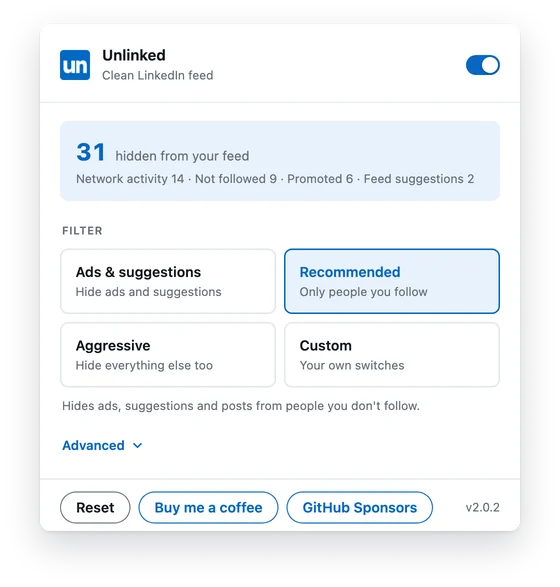
Pick a filter from the toolbar. Recommended is on from the start.
- Ads & suggestions
- Hides promoted and suggested posts only.
- Recommended
- Also hides posts from people you don’t follow and posts your network reacted to.
- Aggressive
- Hides everything but the people you follow, plus the clutter around the feed.
- Custom
- Your own mix of switches, remembered for next time.
Or decide for each kind of post
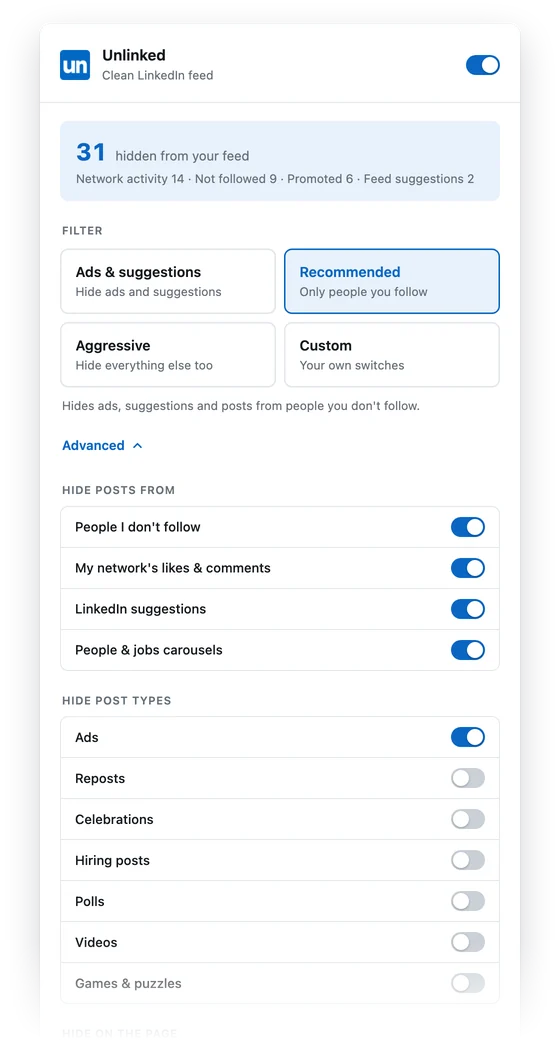
Open Advanced for a switch per kind of post.
- Reposts, celebrations, hiring posts, polls, videos and games
- The news sidebar, your profile sidebar, the messaging pop-up and like counts
- Muted keywords and people, with name suggestions as you type
- Sort the feed by Recent, so posts come in the order they were written
- Focus mode, which hides the whole feed when you only want to post
Nothing leaves your browser
Unlinked runs only on linkedin.com and does all of its work on your computer. There are no accounts, no analytics and no servers. Your settings sync through your own Chrome profile.
- No data collected
- One permission: storage
- Privacy policy
Questions
What is Unlinked?
Unlinked is a free Chrome extension that cleans up your LinkedIn home feed. It hides promoted posts, suggested posts, “liked by” and “commented on” activity and other filler, so the feed shows posts from the people and pages you follow.
How do I clean up my LinkedIn feed?
Install Unlinked, open linkedin.com and pick a filter from the toolbar popup. Recommended keeps posts from people you follow, Ads & suggestions is lighter, and Aggressive hides everything else. Under Advanced you can switch individual items on or off. Read the full guide to cleaning up your LinkedIn feed.
Can I hide LinkedIn ads and promoted posts?
Yes. The Ads & suggestions filter hides promoted posts and LinkedIn’s suggestions, and you can switch ads and suggestions off separately under Advanced.
Can I still see the posts Unlinked hides?
Yes. Turn Unlinked off at any time with the switch at the top of the popup. Or, under Advanced, turn on “Show a line where posts were hidden” to get a thin “N posts hidden” line you can click to bring them back.
Does Unlinked collect my data?
No. Unlinked runs only on linkedin.com, works entirely in your browser and sends no data anywhere. Your settings are saved with Chrome sync, and recently seen author names used for muted-people suggestions stay on your device. See the privacy policy.
Which browsers does it work in?
Unlinked is built for Chrome on desktop. Other Chromium-based browsers such as Edge and Brave can usually install Chrome Web Store extensions, but Chrome is the supported browser.
Is Unlinked free?
Yes, it is free to use. If you find it useful, you can support the project by buying me a coffee or through GitHub Sponsors.
Is Unlinked affiliated with LinkedIn?
No. Unlinked is an independent project and is not affiliated with or endorsed by LinkedIn.
Try it on your own feed
It’s free, and you can switch it off from the toolbar any time.